(2) Programming Fundamentals: Pseudocode
Discover what happened in December 2023. This month features a comprehensive guide to pseudocode, its rules, and conventions for algorithm design.

Programming Fundamentals Posts
- Algorithms
- Pseudocode (current)
An algorithm is useless if nobody else can read it. In the last post, we saw how algorithms give us a list of instructions to solve a problem. Most of this course uses algorithms. To keep things simple, we will write them in pseudocode.
Between English and code
Pseudocode is a simple language that sits between normal language and a real programming language. It gives you a clear, structured way to write an algorithm. You do not need to follow the strict rules of a real programming language.
You use pseudocode to describe the logic and steps of an algorithm before you write it in a programming language. In this course, every example will show the pseudocode and then the same solution in several programming languages. That way you get a “generic” solution first. Later you can write it in any language you like.
The rules we will use
There are many pseudocode standards. I will use a generic one based on the syntax of Pascal, an old programming language known for being easy to read. Nobody runs pseudocode on a computer. Its only job is to help you understand the algorithm behind it. Here are the rules we will follow:
- Indentation. Indentation is the space at the start of a line. It shows the structure of the code and which lines belong together. Code blocks are indented with spaces or tabs.
- Comments. Comments are notes and explanations inside the code. They start with the “#” symbol or “//”.
- Assigning values. To give a value to a variable, use an arrow, like “<-” or “←”. For example, “x ←5” stores the value 5 in the variable x.
- Arithmetic. Pseudocode allows basic math: addition (+), subtraction (-), multiplication (*) and division (/). You can use parentheses to group operations.
- Declaration. You cannot use anything before you declare it. Every variable must have a data type, like a number or text.
- Limits. Each algorithm starts with Algorithm and ends with EndAlgorithm.
- End of instruction. Every instruction ends with a semicolon (;).
- Identifiers. Identifiers are the names you give to things. They must start with a letter and have no spaces.
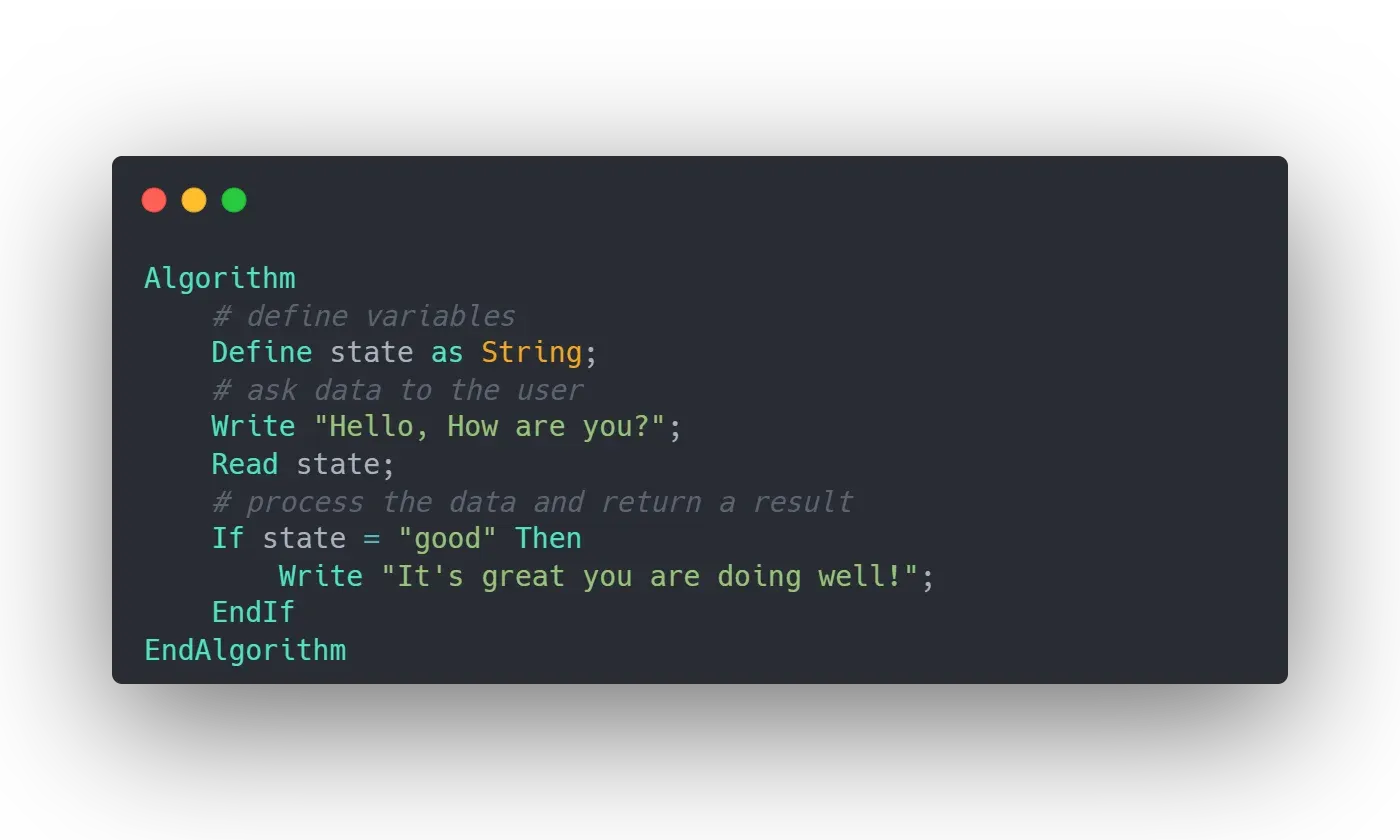
Remember, this is a generic language. You will probably find other pseudocodes with different keywords and syntax. Do not worry. Pseudocode exists so we can share our algorithms clearly, whatever words it uses.
From algorithm to program
A program is a list of instructions written in a specific programming language. It tells a computer how to do a task or solve a problem. The instructions follow a specific syntax and structure.
The three parts of a program
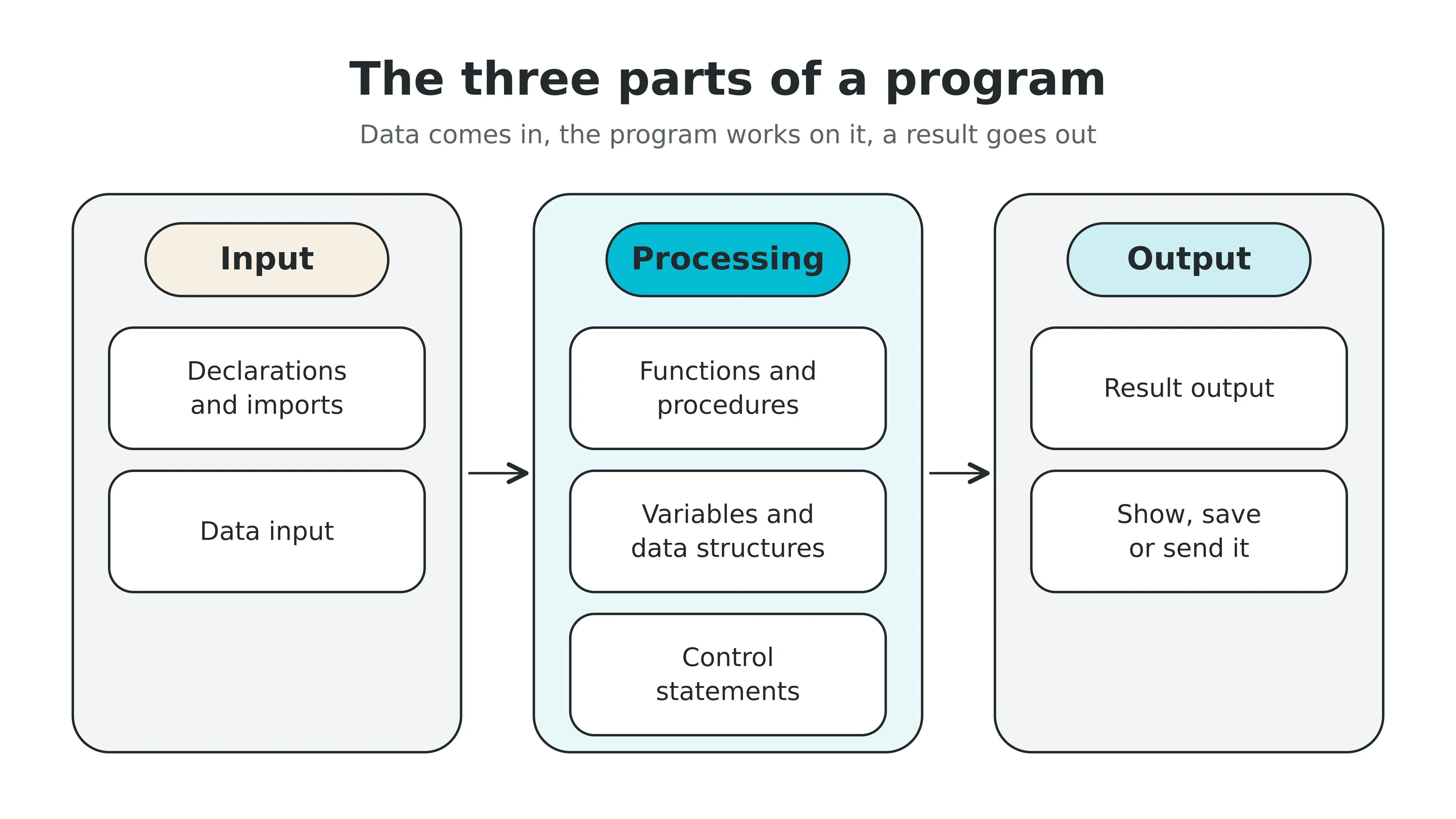
A program usually has three parts. We will study each of their elements in this course.
Input operations
Input usually comes at the start of the program. It shows what the program depends on and what data it needs.
- Declarations and imports. At the start of a program, you can import external libraries or modules. Libraries are code written by others that your program needs to work.
- Data input. Programs often ask the user for information or read it from a file. They need that data to do their work.
Processing
Processing is the work the program does on the input data. It solves the problem and produces a result.
- Functions and procedures. A program can have functions and procedures. These are blocks of code that do one specific task. Other parts of the program can call them, so you reuse code and keep it organized.
- Variables and data structures. Programs use variables to store and change data. A variable can hold a number, a text string or a more complex data structure like a list or a dictionary.
- Control statements. Control statements let the program make decisions. The program does different things depending on certain conditions. They include conditionals, like if else or switch, and loops, like for or while.
Output operations
- Result output. After processing, the program shows the result to the user, saves it to a file, sends it somewhere, or similar. That result is the solution to the problem.
Four kinds of instructions
There is one last idea to learn before we move on: the types of instructions. They change from one programming language to another. Here are some of them:
- Start and end. Every instruction in a program sits between a start and an end. The start is where the program begins, and the end is where it stops. Each programming language marks them in its own way. In Python, indentation marks where a block starts and ends. C-based languages use braces instead.
- Branching. Branching instructions let the program take different paths depending on certain conditions. Common examples are conditionals and loops. We will see them in the next posts.
- Assignment. Assignment instructions give a value to a variable.
- Input and output. These instructions let the program talk to the user. They also read data from different sources and write data to them.
What comes next
Pseudocode lets you write an algorithm in a way you can easily turn into any programming language. We set some rules for our pseudocode here. Remember, it is only one of countless pseudocode standards.
When you write your algorithm in a programming language, the instructions become a program. Most programs have three stages. First, the user enters data. Then the computer processes it. Finally, the program shows the result in the output stage.
We also reviewed the different kinds of instructions. In the next post, we will see how the computer uses and represents data.
If you enjoy the content, please don’t hesitate to subscribe and leave a comment! I would love to connect with you and hear your thoughts on the topics I cover.
Interested in working together? Check out my services and pricing to see how we can collaborate on your next project. Let's Build