What Is an Algorithm? Definition, Examples and Types of Errors: Programming Fundamentals (1)
Learn what an algorithm is, the four traits every algorithm has, how to write one, and the three kinds of errors, with live pseudocode you can run.
An algorithm is a finite list of clear and precise steps that you follow, in order, to solve a problem or finish a task. A recipe is an algorithm. So is every program on your phone. After this lesson, you can design a small algorithm, write it so a computer can run it, and tell which kind of error broke it when it fails.
In this lesson you will:
- Learn the four traits every algorithm has.
- See the five common ways to write an algorithm.
- Design two algorithms and run one of them in your browser.
- Tell syntax, runtime and logic errors apart, and learn how people find each one.
It takes about 30 minutes. You need no installs and no programming experience.
About this series
This is the first lesson of Programming Fundamentals, a free course in 14 lessons. I taught this course at UCAB (Universidad Católica Andrés Bello) in 2023 and 2024, and these posts follow the same path:
- Thinking in steps. Algorithms (this lesson) and pseudocode.
- How code becomes a program. Programming languages, variables and data types, operators and expressions.
- Controlling the flow. Input, process and output, conditionals and loops.
- Working with more data. Strings, arrays and matrices.
- Organizing bigger programs. Procedures and functions, and files.
- Putting it together. A final project that uses everything.
The list at the top of every post shows where you are. Each lesson builds on the one before it, so read them in order the first time.
How to use the live editors
The examples in this series are not pictures of code. Each one is a live editor that runs StepCode, a pseudocode language I built so my students could run their algorithms instead of only writing them on paper. You will learn its rules in the next lesson. For now, you only need three actions:
- Press Run to start the program. Its output appears in the console under the code.
- When the program asks for a value, type it in the console and press Enter.
- Change any line and press Run again. If something is wrong, the editor marks the line and explains the problem in the Problems panel.
Try it with this program. It writes two lines of text.
You should see:
Hello! This program runs in your browser.
Change the text, then press Run again.
Your changes only affect your own screen, so you can break things freely. Reload the page to get the original code back.
Why algorithms matter
Computers know absolutely nothing. A computer cannot make an arepa, pay a salary or find a route unless someone gives it every step, in order, with no gaps. An algorithm is that list of steps. Once it exists, it has three useful properties:
- Reproducible. Anyone who follows it gets the same result.
- Systematic. It breaks a big task into small steps you can check one by one.
- Reusable. You write it once and use it as many times as you need.
Today, AI agents write a lot of the code in the world. That makes algorithms more important, not less. To ask an agent for a program, you must describe the steps clearly. To trust what it writes, you must read the code and check that its steps really solve your problem. The job moved from typing code to understanding it, and understanding code starts with understanding algorithms.
What an algorithm is
An algorithm is a finite set of clear and precise instructions that you follow to solve a problem or do a specific task. The steps run in a fixed order, and together they reach a goal you set at the start. People use algorithms in computer science, mathematics, engineering and everyday life.
Four traits of an algorithm
Every algorithm has four traits:
- Precise. Each step is detailed and has only one meaning. Nobody can read it in two ways.
- Defined. If you start from the same situation, you always get the same result.
- Finite. It has a beginning and an end. After a limited number of steps, it stops.
- Ordered. It is a sequence. You do one step at a time, in a fixed order.
Here is what breaking each trait looks like, using steps from an arepa recipe. An arepa is a round corn bread from Venezuela and Colombia.
Algorithms in daily life
You already follow many algorithms:
- A cooking recipe. It lists exact steps to prepare one dish: cut the ingredients, mix them, cook at a set temperature.
- Navigation instructions. A map app looks at where you are, where you want to go and the roads available. Then it gives you directions one step at a time.
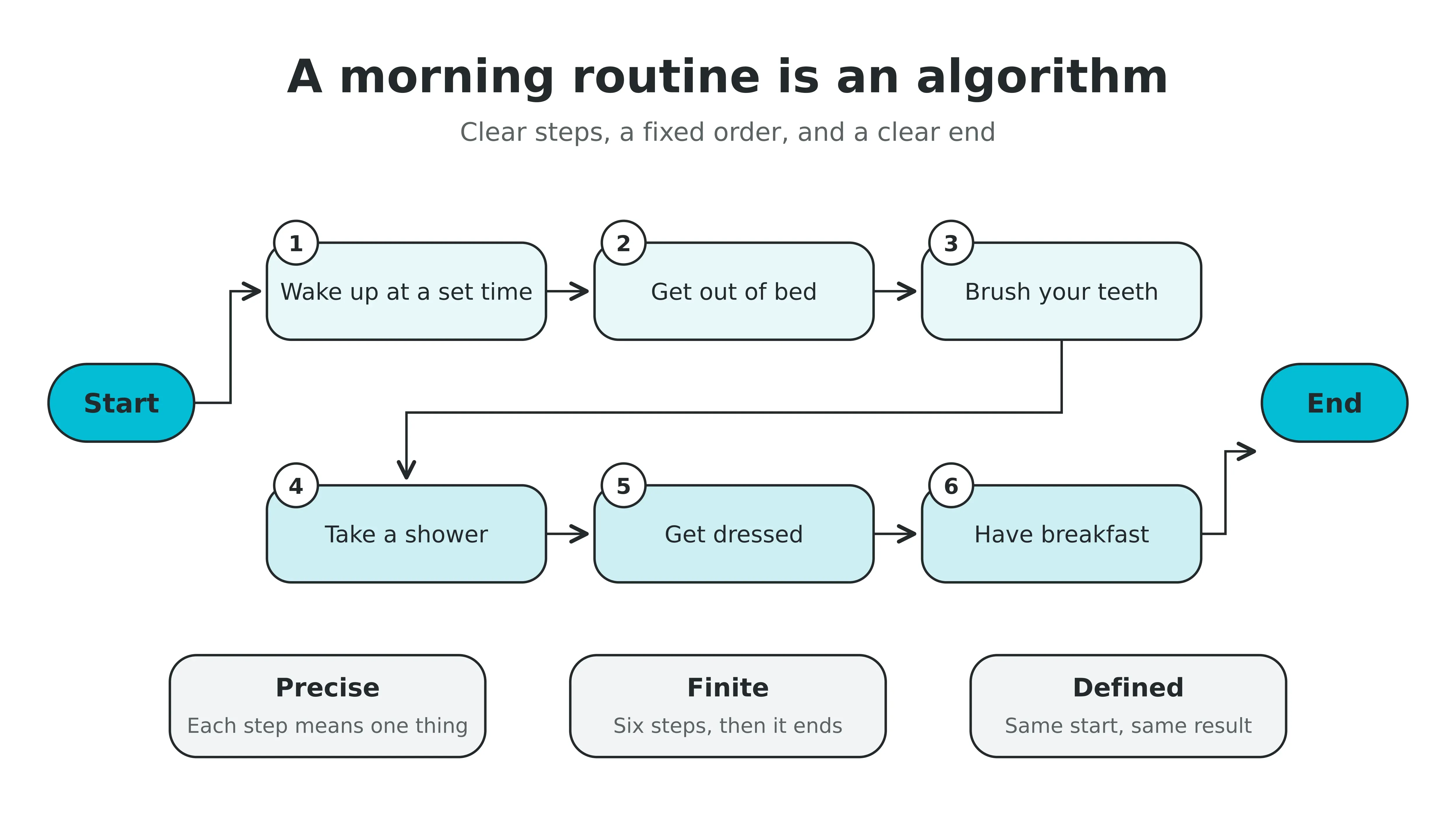
- A morning routine. Wake up at a set time, get out of bed, brush your teeth, shower, get dressed and have breakfast.
Ways to write an algorithm
An algorithm is an idea. To share it, you need to write it down. These are the five most common ways.
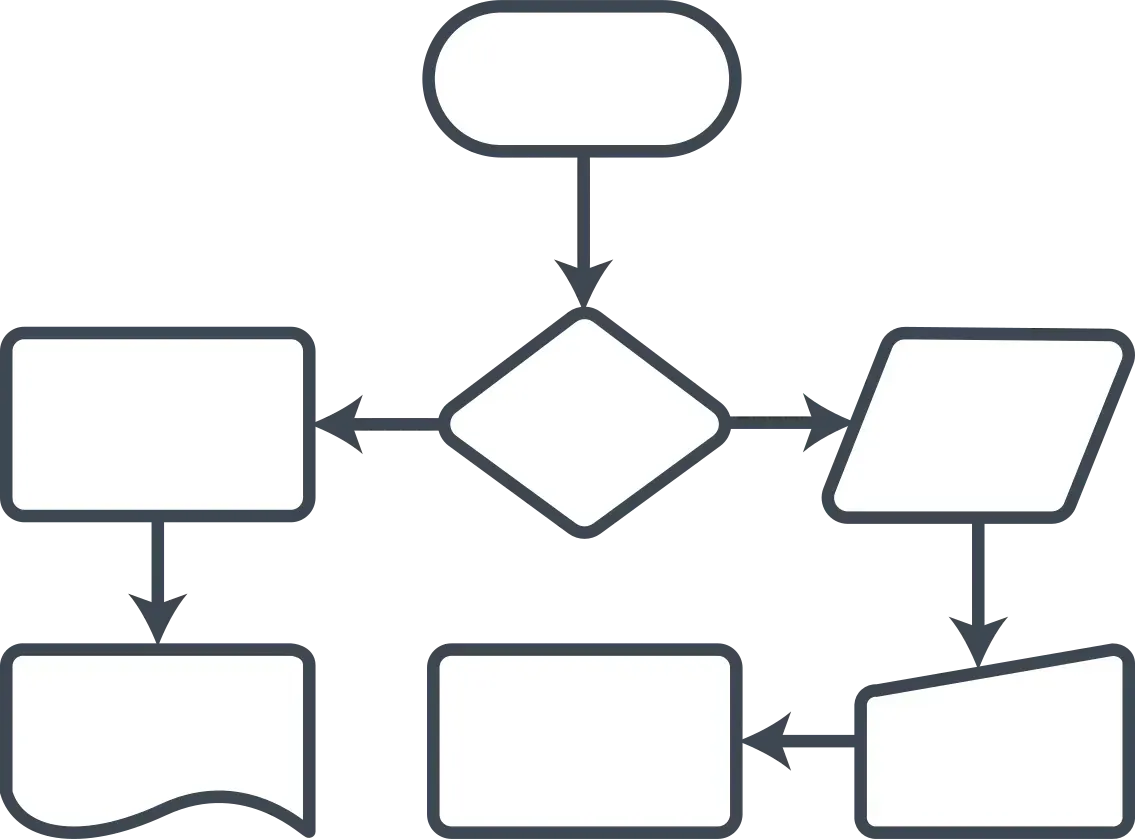
Flowchart. A drawing that uses symbols and arrows. Each symbol has a meaning (a rectangle for an action, a diamond for a decision), and the arrows show which step comes next.
 What is a Flowchart The ultimate guide to understanding flowcharts including history, common uses and helpful how-to instructions.
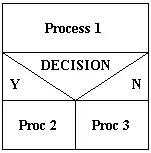
N-S diagram (Nassi-Schneiderman). Another drawing, made of nested blocks. It shows steps in order (sequence), choices (selection) and repeated steps (repetition). It is clear, but to be honest, I have never seen one outside of school.
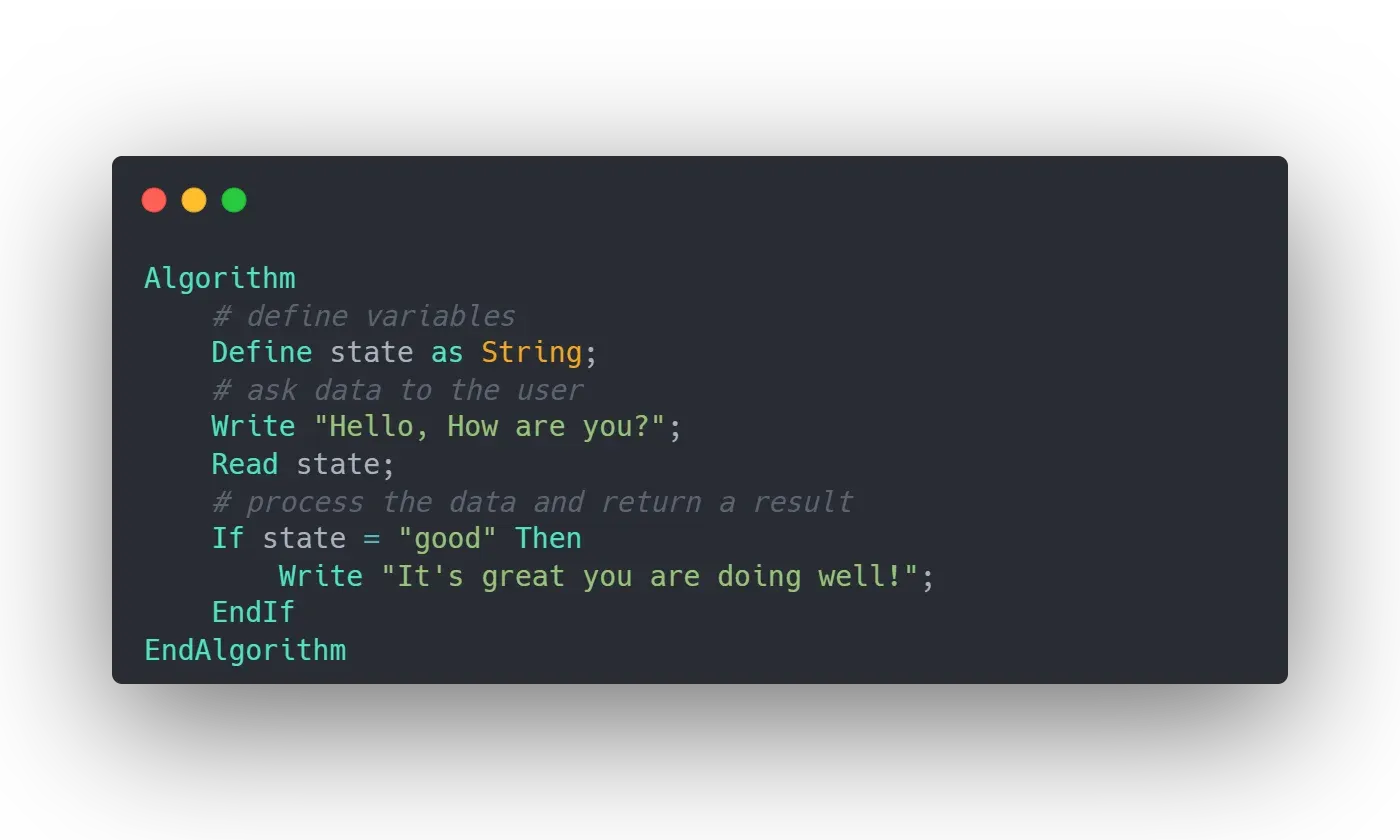
Pseudocode. Text that mixes plain language with the structure of a programming language. It belongs to no single programming language, so anyone can read it and later translate it to any of them. This series uses pseudocode for every example.
Natural language. Plain sentences in English, Spanish or any human language. It is the easiest to write, but also the easiest to make vague.
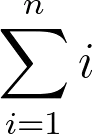
Formulas. Some algorithms are a math formula. The formula below adds the first n whole numbers in one step, with no list of steps at all.
Guided practice: design an algorithm
We will design two algorithms. The first one stays in plain English. The second one goes all the way to a program you can run.
1. Write the arepa algorithm in plain English
The first activity in the class slides was to write an algorithm to make an arepa. Here is one version. Check it against the four traits.
- Put 1 cup of warm water and a pinch of salt in a bowl.
- Add 1 cup of precooked corn flour, little by little, while you mix.
- Knead the dough for 2 minutes, until it is soft.
- Make a ball with the dough and press it into a disk.
- Cook the disk on a hot pan for 5 minutes on each side.
- Serve the arepa.
Every step says how much and how long (precise and defined). There are six steps and then it stops (finite). And you cannot cook the dough before you make it (ordered).
You should see: a list where you could hand any step to a friend who has never cooked, and they would know exactly what to do. If a step needs the words “some”, “a bit” or “until it looks right”, make it more precise.
2. Design the salary algorithm
Now a problem a computer can solve. A company pays a worker by the hour. It knows the worker’s name, the hours worked and the pay per hour. Taxes take 31% of the earnings. We want the gross salary (before taxes) and the net salary (after taxes).
Before you write any code, write the steps in plain language:
- Ask for the name, the hours worked and the pay per hour.
- Multiply the pay per hour by the hours worked to get the gross salary.
- Multiply the gross salary by 31% to get the taxes.
- Subtract the taxes from the gross salary to get the net salary.
- Show the gross salary, the taxes and the net salary.
You should see: five steps, each with one action. This list is the real algorithm. The next part only translates it.
3. Run the salary algorithm in StepCode
Here are the same five steps written in StepCode. You do not need to understand every word yet. Look at the comments (the lines that start with //): each one matches a step from your list.
Press Run and type Ana, 40 and 12.5, pressing Enter after each one.
You should see:
Name:
Hours worked:
Pay per hour:
Ana earns 500 before taxes
Taxes: 155
Net salary: 345
Check it by hand: 40 hours times 12.5 is 500, 31% of 500 is 155, and 500 minus 155 is 345. The program is correct because the algorithm was correct first.
Three kinds of errors
Programs fail. Every programmer, and every AI agent, writes errors. What matters is knowing which kind of error you have, because each kind shows up at a different moment and needs a different fix.
Pick a program above to see when its error shows up.
Syntax errors break the rules
A syntax error means the code does not follow the rules of the language. The program cannot even start. Find the error in this program: one line is missing its semicolon (;), which in StepCode marks the end of each instruction.
Press Run. The program does not start. The editor marks line 5 and shows this message:
This statement is missing its ";".Add the ; at the end of line 5 and run it again with 4 and 6. You should see:
First number:
Second number:
The average is 5
Syntax errors are the easiest kind to fix, because the tool tells you the line. Programming languages shows the step inside a compiler that finds them.
Runtime errors stop the program
A runtime error happens while the program runs. The code follows every rule, but one step is impossible. Division by zero is the classic case, and dividing two numbers was one of the activities of the first unit.
Run it with 10 and 4. You should see:
Dividend (n1):
Divisor (n2):
The result is 2.5
Now run it again with 10 and 0. The program stops on line 7 and never writes a result. The editor shows:
This divides by zero: "/" received a divisor equal to 0.The code was the same both times. Only the input changed. That is why runtime errors are hard: a program can work in every test you tried and still fail with the one value you did not try.
Logic errors give wrong answers
A logic error means the code is valid and runs to the end, but it does the wrong thing. There is no message. This program should print the average of two numbers.
Run it with 4 and 6. You should see:
First number:
Second number:
The average is 7
The average of 4 and 6 is 5, not 7. The computer did exactly what line 7 says: it divided b by 2 first, and then added a. The fix is to group the sum with parentheses: average <- (a + b) / 2;. Make that change and run it again to get 5.
Step through both versions of line 7 below and watch which operation runs first.
4 + 6 / 2 → 4 + 3 → 7 (wrong)
(4 + 6) / 2 → 10 / 2 → 5 (right)
Logic errors are the most dangerous kind. They hide in code that looks fine, whether a person or an AI agent wrote it. The only way to catch them is to know what the right answer is and compare.
How to find errors
These four strategies come from my class slides, and they still work today:
- Testing. Run the program with different inputs, including unusual ones like
0, negative numbers or empty text. Work out the right answer by hand first. - Code analysis. Read the code slowly and look for weak points. Ask “what happens if this value is zero?”
- Peer review. Ask another person to read your code. They see what you stopped seeing.
- Tools. Linters (programs that check code for common problems) and AI assistants can point at suspicious lines. Treat what they say as a suggestion you still need to check.
Common mistakes
If a step can be read two ways, it is not precise. “Add some flour” gives a different arepa every time. Write the exact amount, the exact time or the exact rule.
If your steps skip something obvious to you, the computer will not fill the gap. In the salary algorithm, nobody would forget to ask for the hours. But if you do, the computer has no hours to multiply. Read your list as if you know nothing, like a computer.
If the result is wrong but there is no error message, suspect the order of your steps or your math. Check each step by hand with simple numbers, as we did with 4 and 6. In Input, process and output you learn the trace table, a simple way to do this on paper.
Algorithm or program?
People often use the two words as if they were the same. They are related, but they are not the same thing.
| Algorithm | Program | |
|---|---|---|
| What it is | The steps that solve a problem | Those steps written in a language a computer runs |
| Written in | Any form: words, drawings, pseudocode, formulas | One programming language, with strict rules |
| Who runs it | A person or a computer | A computer |
| Example | The five salary steps in your list | The StepCode salary program |
One algorithm can become many programs, one for each programming language. You will see that in the lesson on programming languages.
Practice exercises
Exercise 1. Name the kind of error in each case: syntax, runtime or logic.
- A program that calculates the area of a rectangle multiplies the base by itself instead of by the height.
- A program forgets the
;at the end of a line. - A program divides the total of a bill by the number of people, and someone types
0people.
Exercise 2. Write your morning routine as an algorithm in plain English. Check that every step is precise, defined, finite and ordered.
Exercise 3. Write the steps, in plain English, to calculate the area of a triangle when you know its base and its height.
Solutions
Exercise 1. (1) Logic: it runs and finishes, but the answer is wrong. (2) Syntax: the program cannot start. (3) Runtime: the code is valid, but dividing by 0 stops it.
Exercise 2. Answers vary. A good one says the exact time you wake up, and has no step like “get ready”, which hides many steps inside one.
Exercise 3. Ask for the base. Ask for the height. Multiply the base by the height. Divide the result by 2. Show the result. You will turn these steps into a program in the next lesson.
What you learned
- An algorithm is a finite, ordered list of precise steps that solves a problem, and it always gives the same result for the same start.
- You can write an algorithm as a flowchart, an N-S diagram, pseudocode, natural language or a formula.
- A good program starts with a good algorithm in plain language. The code only translates it.
- Syntax errors stop a program before it starts, runtime errors stop it while it runs, and logic errors give a wrong answer with no message.
- Testing with answers you worked out by hand is how you catch logic errors, in your code and in code an AI wrote for you.
Next steps
- Continue with Pseudocode, where you learn the rules of StepCode and write your own programs from scratch.
- Read more about StepCode and why I built it.
If you enjoy the content, please don’t hesitate to subscribe and leave a comment! I would love to connect with you and hear your thoughts on the topics I cover.
Interested in working together? Check out my services and pricing to see how we can collaborate on your next project. Let's Build