How to Create a Programming Language
Learn how to create your own programming language interpreter. Explore Abstract Syntax Trees (AST), ANTLR4, grammar design, and language implementation using StepCode as a practical example.
Two years ago, I was teaching Algorithms and Programming. We used pseudocode a lot. Pseudocode is a way to write the steps of a program in plain words. It lets students focus on the logic, without the strict rules of languages like Java or C++. But there was always a small problem.
My students wrote their algorithms in pseudocode with care. They mapped out loops and conditions and really thought through the steps. Then they had no easy way to run it. How do you know if your pseudocode works? How do you test edge cases? How do you debug it? It felt like teaching someone to describe a recipe perfectly, but never letting them cook it.
So I asked myself, “What if they could run it? What if pseudocode was more than static text on a page?” That question became StepCode. I decided to build an interpreter for the kind of pseudocode we used in class. I also wanted it to be easy to reach. No installs and no setup. You open a web browser on any device with Internet, and you run your code.
In this post, I show you how to create your own programming language like StepCode. We will define it and design its syntax. Then we turn the text into tokens and a tree. Last, we interpret that tree so the machine can run it.
Start with the why
Before you write a single line of the interpreter, you need to figure out the language itself. What problem does it solve? Who is it for?
For StepCode, the why was clear:
- Education: Make it easier to learn the basics of programming (loops, conditions, variables) without fighting the strict syntax of C++ or Java on day one.
- Accessibility: Give Spanish speakers an easier path by allowing keywords in English and in Spanish. Think
IFandSI, orWHILEandMIENTRAS.
With the why settled, the what started to take shape. Which features did StepCode really need? I kept the list focused:
- The basics: Variables, assigning values, reading input and showing output.
- Decisions:
IF/THEN/ELSElogic, withELIFincluded (orSI/ENTONCES/SINO/SINO SI). I also addedCASE(SEGUN) statements for choices with many options, even though I hate this type of statement. - Loops:
WHILE(MIENTRAS),FOR(PARA) andREPEAT/UNTIL(REPETIR/HASTA QUE). - Structured programming: Splitting code into reusable pieces with
PROCEDURE(SUBPROCESO) andFUNCTION(FUNCION). - Data types: Only the basics, like
INTEGER(ENTERO),REAL,STRING(CADENA) andBOOLEAN(LOGICO).
The last decision was whether StepCode would be a compiled language or an interpreted one. Think of an interpreter like a person who translates a speech live. An interpreter program reads StepCode line by line and runs each action right away. A compiled language like C++ works differently. A compiler first translates all your code into machine instructions and creates a separate executable file.
An interpreter is usually simpler to build. It also gives immediate feedback, which is great for learning. The StepCode interpreter would turn each statement into JavaScript that runs in the browser.
Borrow a readable syntax
Once you know what your language should do, you need to decide how people will write it. This is the syntax: the grammar, the keywords and the symbols.
For StepCode, I took inspiration from Pascal. Pascal is known for being readable and structured, and schools use it often. That made it a great choice. There was a second reason too. The ANTLR4 grammar for Pascal was already on GitHub, so I had a solid base to start from.
 grammars-v4/pascal/pascal.g4 at master · antlr/grammars-v4 Grammars written for ANTLR v4; expectation that the grammars are free of actions. - antlr/grammars-v4
Now, about the two languages. How do you make IF and SI mean the same thing? This is where careful grammar design helps. When we define the IF keyword in our language rules, we tell the parser one thing. If you see the text IF or the text SI, treat it as the start of an if statement. In the grammar file, which we will see later, it looks like this:
IF: 'SI' | 'IF'; // Treat 'SI' or 'IF' as the IF token
WHILE: 'WHILE' | 'MIENTRAS'; // Same idea for WHILE
Example of grammar definition
Simple, right? I also made StepCode case insensitive, so IF is the same as iF. People often write pseudocode by hand or type it casually. This rule removes one more thing that could frustrate a learner.
From text to a tree
So we have a language design. How does the computer understand code written in StepCode? Imagine someone writes this:
PROCESO Saludo
    DEFINIR nombre COMO CADENA;
    ESCRIBIR "Como te llamas?";
    LEER nombre;
    SI nombre == "mundo" ENTONCES
        ESCRIBIR "Hola, mundo!";
    SINO
        ESCRIBIR "Hola, ", nombre, "!";
    FINSI
FINPROCESO
StepCode Snippet
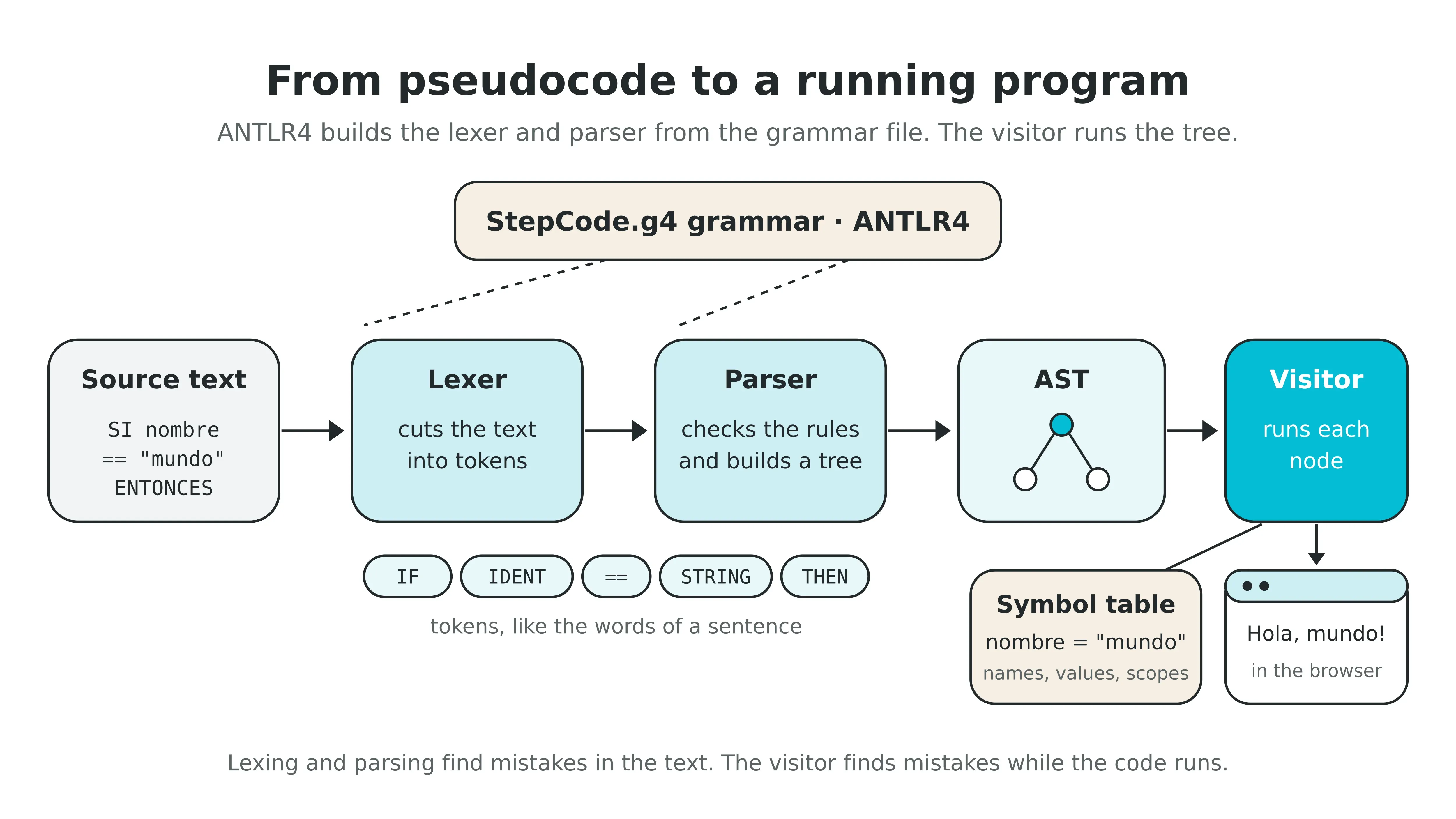
How does that text turn into actions? This is where parsing comes in. It usually happens in two steps:
- Lexing (or tokenizing): The lexer breaks the raw text into meaningful pieces called tokens.
PROCESObecomes aPROGRAM_KEYWORDtoken.Saludobecomes anIDENTIFIERtoken.DEFINIRbecomes aDEFINE_KEYWORDtoken, nombre is anotherIDENTIFIER,==is anEQUALS_OPERATOR,` "Hola, mundo!"is aSTRING_LITERAL, and so on. It is like finding the words and the punctuation in a sentence. - Parsing: The parser takes that stream of tokens and checks if they form valid sentences under the grammar rules. Does a
DEFINEkeyword follow the rules we set? Does anIFstatement have aTHENand anENDIF? The parser usually builds a tree called an Abstract Syntax Tree (AST). The AST shows the logical structure of the code.
Can you write a lexer and a parser from scratch? Yes, but trust me, it is hard. You need to handle operator precedence (should * happen before +?), nested structures and every grammar rule. It is easy to make mistakes.
This is why tools called parser generators exist. They write the lexer and parser for you. One of the most popular is ANTLR4 (ANother Tool for Language Recognition).
 ANTLR ANother Tool for Language Recognition. A powerful parser generator for reading, processing, executing, or translating structured text or binary files.
Here is how ANTLR4 works:
- You write a grammar file, which usually ends in .g4. This file defines all the rules of your language. It has lexer rules (what tokens look like) and parser rules (how tokens fit together).
- You run the ANTLR4 tool on your .g4 file.
- ANTLR4 generates source code for a lexer and a parser that understand your language. It can write that code in Java, Python, C#, JavaScript and other languages.
Write the grammar top down
Writing a grammar file is like teaching ANTLR4 the rules of your language, one piece at a time. It needs to know two main things:
- What are the basic words and symbols? These are the tokens, defined by lexer rules.
- How can those words and symbols combine? These are the syntax structures, defined by parser rules.
It is similar to learning English. First you learn the alphabet and basic words (tokens). Then you learn how to build sentences and paragraphs (parser rules).
When I started the StepCode.g4 file, I thought about the overall shape of a StepCode program. What is the biggest container? A program might define some functions or procedures, then the main part, and maybe more functions or procedures after that.
So the first rule I wrote, or at least thought about, looked like this:
// This is the main entry point, the biggest rule
program: subprogram* main subprogram* EOF;
(Simplified slightly for explanation)
Let’s break it down:
- program: This is the name I gave to the rule that represents the whole program. Rule names usually start with a lowercase letter.
- main: This means “match exactly one instance of whatever the main rule defines”. Every program needs a main part with code to run.
- subprogram*: This means “match zero or more (*) instances of whatever the subprogram rule defines”. Here, zero or more procedures or functions can appear before the main part.
- EOF: This one is very important. It means “End Of File”. It tells ANTLR that a valid program must use all the input text. Without it, ANTLR might parse only the first valid part of a file and ignore the rest, even if the rest is junk.
We started with the overall structure and used placeholders (subprogram, main) for the smaller pieces. This is called a top down approach, and it is often a good way to start. Next, we define those smaller pieces.
Parser rules describe statements
Let’s look at how main might be defined:
main: programHeading block ENDPROGRAM;Simple enough. A main section has three parts:
- programHeading: Another rule we need to define (for example,
PROGRAM MyAlgoorPROCESO MiAlgoritmo). - block: The actual code block, with declarations and statements. Another rule to define.
- ENDPROGRAM: This one is different. It is in ALL CAPS. By convention, that means it is a token, one of the basic words the lexer defines. Here it matches the literal text
ENDPROGRAM(orFINPROCESO, and others, as we will see).
Now let’s look at a more interesting structure, the if statement:
ifStatement: IF expression THEN compoundStatement (elseStatement?) ENDIF;

// And maybe the else part:
elseStatement: ELSE compoundStatement;
(Simplified slightly for explanation)
Here we see more patterns:
- IF, THEN, ELSE, ENDIF: These are tokens (keywords). The parser expects to see these exact words.
- expression, compoundStatement, elseStatement: These are other parser rules we need to define. An expression might be something like x > 10. A compoundStatement is a sequence of real programming statements.
- (elseStatement?): The parentheses group elseStatement, and the ? makes the group optional. An if statement does not need an else part.
What about a list, like declaring several variables at once?
variableDeclaration: identifierList AS type_; // Using other rules
DEFINE variableDeclaration SEMI; // Putting it together

identifierList: identifier (COMMA identifier)*; // The list itself
Let’s look closer at identifierList:
- identifier: Match one instance of the identifier rule, which matches variable names.
- (COMMA identifier)*: The parentheses group this part. The * means “match what is inside zero or more times”. Inside there is a COMMA token followed by an identifier. So the whole rule matches one identifier, followed by optional commas and more identifiers (like x, or x, y, or x, y, z).
Lexer rules describe tokens
We have seen parser rules use ALL CAPS names like IF, ENDPROGRAM and COMMA. Where do those come from? They come from the lexer rules, which usually appear after the parser rules in the .g4 file. Lexer rules define the basic tokens.
Ignoring whitespace and comments: This is very important. You do not want spaces or comments to clutter your parser tokens.
// Match one or more spaces, tabs, newlines and 'skip' them (don't create a token)
WS : [ \t\r\n]+ -> skip ;

// Match // followed by any characters except newline, then skip
COMMENT_1 : '//' ~[\r\n]* -> skip ;
The -> skip command tells the lexer to recognize this pattern and then throw it away. It never reaches the parser. In this case, we drop everything after a double slash //.
Operators and punctuation: These are simple mappings.
ASSIGN : ':=' | '<-' | '\u2190' ; // Allow := OR <- OR the ← symbol
SEMI   : ';' ;
PLUS   : '+' ;
LPAREN : '(' ; // Left parenthesis
Literals (numbers and strings): These also match patterns.
NUM_INT : ('0'..'9')+ ; // One or more ('+') digits. Matches 1, 123, 0.

// Matches things like 'Hello world' or "It's okay"
STRING_LITERAL : '\'' ( '\'\'' | ~'\'' )* '\''   // Single quotes
               | '"' ( '""' | ~'"' )* '"' ;     // Double quotes
               // This looks complex! It handles escaped quotes ('') inside strings.
               // ~'\'' means "any character that is NOT a single quote".
Identifiers (variable names and similar): These follow a pattern. Usually they are letters, with numbers and underscores allowed after the first letter.
// Matches typical variable names like MiVariable, contador1, etc.
IDENT : ('A'..'Z') ('A'..'Z' | '0'..'9' | '_')* ;
Here is how to read it:
- (‘A’..‘Z’): The name must start with an uppercase letter (or lowercase, because the language is case insensitive). The .. defines a range.
- (‘A’..‘Z’ | ‘0’..‘9’ | ‘_’)*: After the first letter, the name can have zero or more (*) letters, OR (|) digits, OR underscores.
Keywords: These are usually the simplest. You map the literal text to the token name. Remember the goal of two languages?
PROGRAM : 'PROCESO' | 'ALGORITMO' | 'PROGRAM' ; // A PROGRAM token matches any of these strings
IF      : 'SI' | 'IF' ;
THEN    : 'THEN' | 'ENTONCES' ;
DEFINE  : 'DEFINIR' | 'VAR' ; // Allowing 'VAR' too
ENDPROGRAM : 'FINPROCESO' | 'FINALGORITMO' | 'ENDPROGRAM' ;
So the lexer creates a PROGRAM token when it sees the exact text PROCESO, ALGORITMO or PROGRAM. Remember that StepCode is case insensitive, so it also matches program, Proceso and so on.
Walking the tree
At this point, ANTLR4 has done its job. It took the StepCode source code, used the .g4 grammar and produced an Abstract Syntax Tree (AST). But an AST is only a data structure, a tree that represents the code. It does nothing by itself. So how do we run the logic?
That is the job of the interpreter. A common way to build one, especially with ANTLR4, is the Visitor pattern. A visitor is an object that goes to each node of the tree and decides what to do there.
ANTLR4 generates a base Visitor class for you (StepCodeBaseVisitor in our case). It has an empty method for each rule in your grammar, like visitIfStatement, visitAssignmentStatement and visitWhileStatement. Our job is to create our own class that inherits from this base visitor. Then we override those methods and fill them with the logic that runs each part of the code.
Here is how it might work:
- visitAssignmentStatement(ctx): The visitor reaches an assignment node in the AST, like x := 10.
- It needs the value on the right side. So it calls visit() on the expression part of the node. This may visit other nodes, like number nodes or variable nodes, until it gets a final value (10, in this case).
- It needs to know where to store this value. It gets the variable name (x) from the node.
- It looks up x in a symbol table (more on that soon) and stores the value (10) there.
- visitIfStatement(ctx): The visitor finds an IF node.
- It first visits the expression part, the condition, to get true or false.
- If the result is true, it visits the nodes inside the THEN block (the
compoundStatement). - If the result is false, it checks for an ELSE or ELIF block. If there is one, it visits that block. If not, it does nothing more for this IF statement.
- visitWriteStatement(ctx): This one is fairly simple. It visits the expressions inside the WRITE (ESCRIBIR) command to get their values. Then it prints those values to the console.
Let’s remember how we structured an if statement:
ifStatement: IF expression THEN compoundStatement (elseStatement?) ENDIF;Here is the visitor code that runs when the interpreter finds one:
  visitIfStatement = async (ctx: IfStatementContext) => {
    const expression = await this.visit(ctx.expression()) as ExpressionReturnType
    if (expression.value) {
      return await this.visit(ctx.compoundStatement())
    } else {
      if (ctx.elifStatement()) {
        return await this.visit(ctx.elifStatement())
      }
      if (ctx.elseStatement()) {
        return await this.visit(ctx.elseStatement())
      }
    }
    return {
      identifier: `${expression.identifier}`,
    }
  }
First it evaluates the expression. If the value is truthy, it visits the compoundStatement and returns its result. If not, it checks for an else or elif statement and visits it when there is one.
The symbol table
The interpreter needs to remember things, mainly variables, functions and procedures. Where do they live? In a symbol table, sometimes called an environment. Think of it like an address book. The interpreter writes down each variable name with its current value, and each function name with its definition.
This is also where scope comes in. Scope is the part of the program where a name exists. When you define a variable inside a PROCEDURE, it should only exist inside that procedure. It should not clash with a variable of the same name outside it. The symbol table handles this, usually with nested scopes. To look up a variable, the interpreter checks the current local scope first. Then it checks the scope around it, and so on, up to the global scope.
For StepCode, handling DEFINE identifierList AS type_ meant the visitor had to add those identifiers to the current scope. I also had to decide about types. StepCode defines types (AS INTEGER, COMO CADENA). I chose to check them while the program runs. So if you try to add a number and a string, the interpreter raises a runtime error.
Parameters needed care too. StepCode supports BYVALUE (POR VALOR) and BYREFERENCE (POR REFERENCIA). By value copies the value. By reference passes a link to the original variable. Both required careful work in the symbol table and in how function calls pass arguments.
Walking the tree and updating the symbol table is the heart of the interpreter. This is where the static structure of the code becomes a running program.
The hardest parts
Building StepCode was not always easy. You hit problems, solve puzzles and learn a lot. Some challenges were more “interesting” than others.
Grammar puzzles in ANTLR4:
- Ambiguity: Sometimes ANTLR4 complained that the grammar was ambiguous. This means there was more than one way to read a sequence of tokens with the rules I wrote. It usually happened with complex expressions. To fix it, I often had to restructure the rules to be more specific about precedence or structure.
- Evolution: As StepCode grew, the grammar needed updates. A new feature sometimes meant rethinking old rules so everything still fit together.
I really recommend installing the ANTLR extension. It shows your AST in real time, which helps you sort out these problems.
Interpreter problems:
- Scope: Getting variable scope right is famously hard, especially with nested procedures or functions. Variables had to be visible where they should be and hidden where they should not. That required careful design of the symbol table, and of how scopes change during function calls and returns.
- Runtime errors: ANTLR4 is great at catching syntax errors (“You forgot a semicolon!”). But some errors only happen when the code runs. You might use a variable that was never defined (Variable ‘x’ not defined), divide by zero or add text to a number (Type mismatch). The interpreter must detect these while it runs and report them clearly. Helpful error messages matter a lot for learners, but people often forget them. “Error on line 15” is much worse than “Error on line 15: Cannot add the text ‘Hello’ to the number 10.”
- Control flow statements: Some statements change the normal order of the program.
BREAK(ROMPER) exits a loop early.CONTINUE(CONTINUAR) skips to the next round of a loop.RETURN(REGRESAR) leaves a function. These needed special handling. You cannot just stop visiting. You need a way to send a signal back up the chain that the normal flow has stopped. This often means special return values, or even exceptions inside the interpreter. - Two languages at once: As the language grew, I found some conflicts between the Spanish tokens and the English tokens.
So, what was the hardest part? Probably making scope management and runtime error handling truly solid. In fact, I left the project before I fully fixed them.
What building it taught me
That was a fast tour of building a pseudocode interpreter, with StepCode as our guide.
Building something like StepCode is about more than the final program. It is about what you learn on the way. I gained a deep respect for how the languages we use every day work inside. Parsing, abstract syntax trees and interpreters stopped being academic terms for me. They became tools I have used.
If any part of this made you curious, I really encourage you to build something small yourself. You can also contribute to StepCode. With AI, it should be easier than ever.
 GitHub - RolandoAndrade/stepcode Contribute to RolandoAndrade/stepcode development by creating an account on GitHub.
Together, we can build the best pseudocode interpreter out there.
Resources to go deeper
If you want to explore this further, here are some great resources:
- ANTLR4: The official website (antlr.org) has documentation, downloads and examples. People also often recommend “The ANTLR Mega Tutorial”.
 The ANTLR Mega Tutorial The definitive ANTLR mega tutorial on ANTLR4. Learn everything you need to know with code in JavaScript, Python, Java and C#.
- “Crafting Interpreters” by Robert Nystrom: This book is amazing. It guides you through building two complete interpreters, one that walks a tree in Java and one bytecode virtual machine in C. The explanations are very clear.
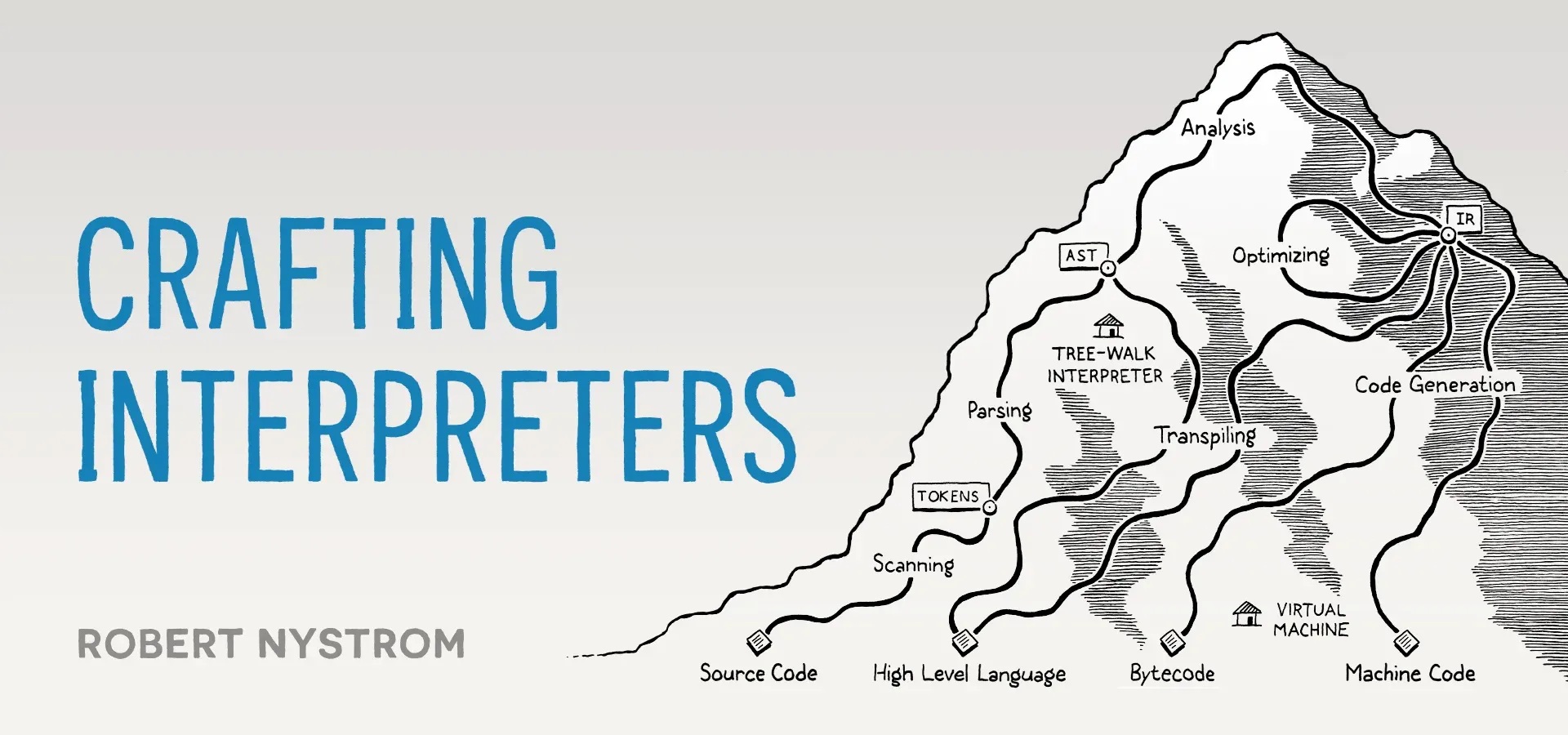 Crafting Interpreters A handbook for making programming languages by Robert Nystrom. Learn to build interpreters from scratch.
- The StepCode project: If you want to contribute, check out the repositories. You can work on the language (the interpreter) or on the online editor (the IDE).
GitHub - RolandoAndrade/stepcode Contribute to RolandoAndrade/stepcode development by creating an account on GitHub.  GitHub - RolandoAndrade/stepcode-editor Contribute to RolandoAndrade/stepcode-editor development by creating an account on GitHub.
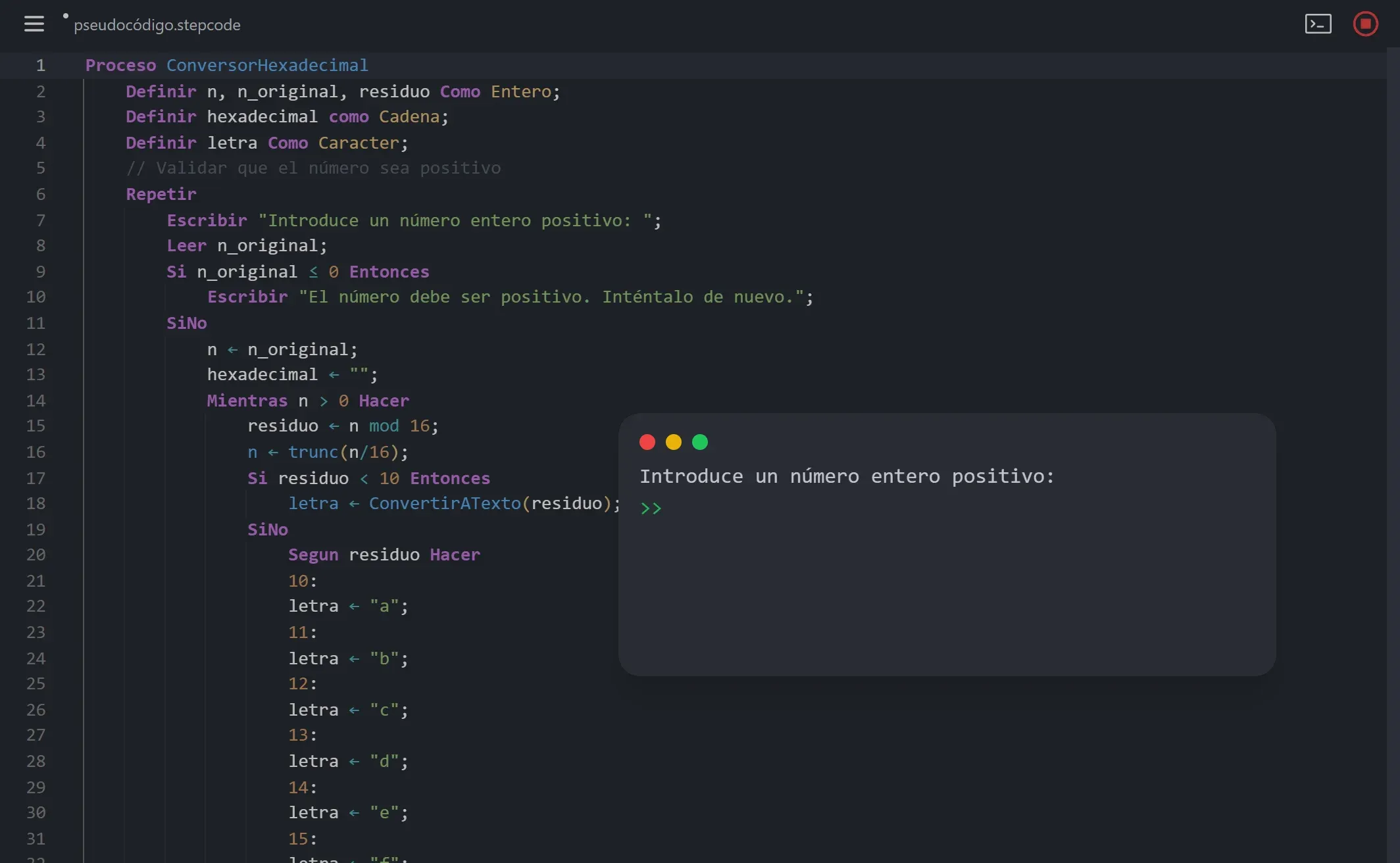 StepCode - Online Tool Try StepCode now! An online pseudocode interpreter for learning programming.
I hope to see you in my next post!
Interested in working together? Check out my services and pricing to see how we can collaborate on your next project. Let's Build