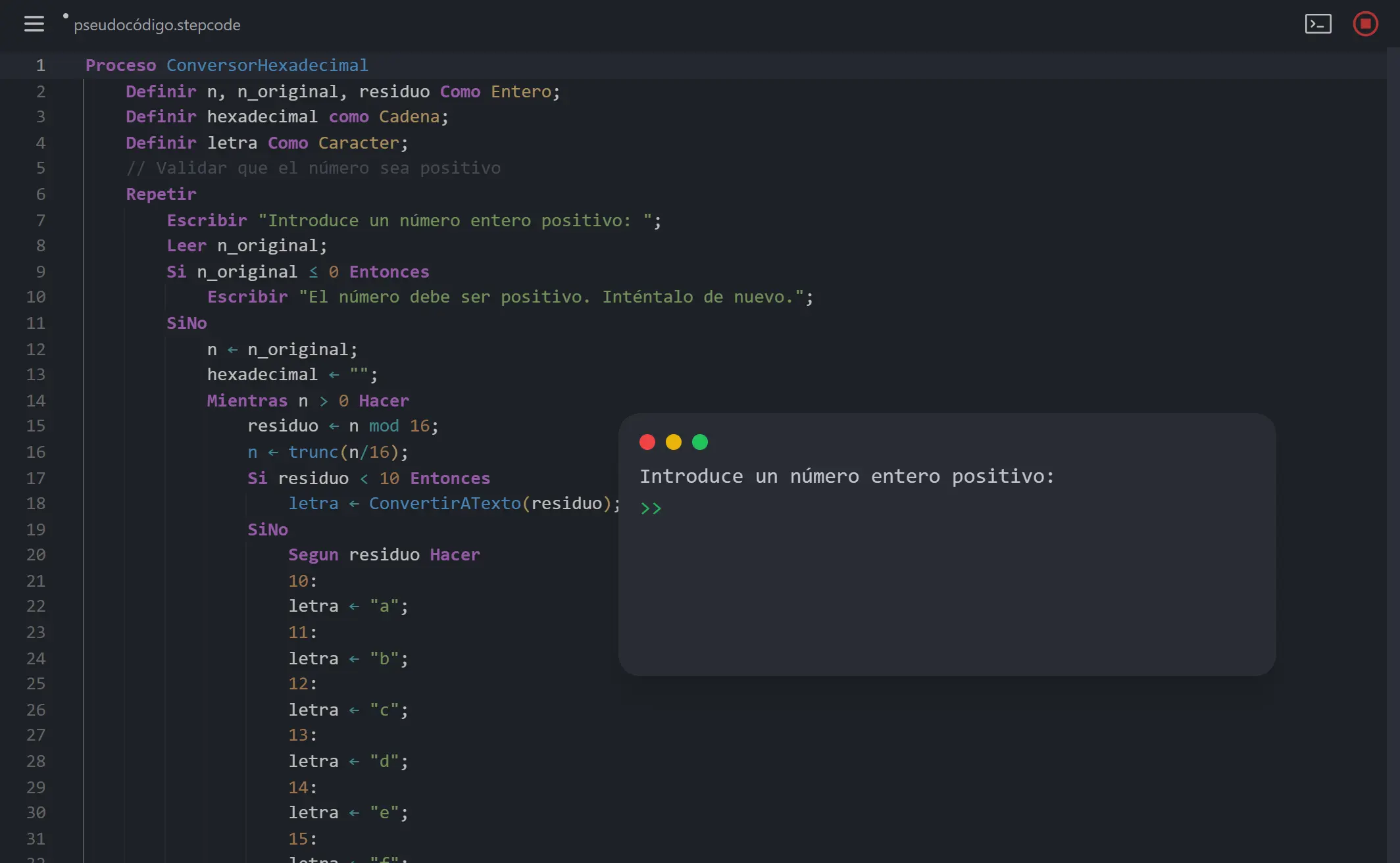
StepCode Editor is a browser-based IDE for writing and running pseudocode. I built it to give students a real coding experience while learning programming fundamentals. No installation required. Just open the browser and start coding.
The Problem
Teaching programming with pseudocode has always felt disconnected. Students write on paper or in basic text editors. They cannot run their code. They cannot see errors in real time. The gap between pseudocode and real programming feels too wide.
I wanted to close that gap. StepCode Editor runs pseudocode directly in the browser. Students see their algorithms execute. They get immediate feedback. The learning loop becomes much tighter.
Building the Editor with CodeMirror 6
The editor is built on CodeMirror 6. This is a complete rewrite of the popular CodeMirror library. It uses a modular architecture that makes customization straightforward.
CodeMirror 6 handles the heavy lifting. Syntax highlighting. Line numbers. Code folding. Keyboard shortcuts. I just needed to teach it how to understand StepCode.
The editor state is immutable. Every change creates a new state. This makes undo/redo trivial. It also makes the editor predictable and easy to debug.
Custom Grammar with Lezer
CodeMirror 6 uses Lezer for parsing. Lezer is an incremental parser that only re-parses changed portions of the document. This keeps the editor fast even with large files.
I created a separate npm package called lezer-stepcode that defines the grammar. It understands StepCode’s structure: processes, functions, loops, conditionals, and variable definitions.
The grammar enables smart features. The completion system knows what suggestions make sense based on context. Inside a loop, it suggests loop-specific keywords. Inside a function, it suggests return statements. This context-awareness comes directly from the Lezer parse tree.
Smart Symbol Replacement
One feature I am proud of is automatic symbol replacement. When you type <-, it becomes ←. Type != and it becomes ≠. Same for <=, >=, and ->.
This happens in real time as you type. The editor watches for these patterns and replaces them instantly. Your code looks cleaner. It matches how pseudocode appears in textbooks.
The implementation uses CodeMirror’s update listener. On every change, it scans for patterns and dispatches replacement transactions. The user never notices the swap. It feels natural.
const matches = value.matchAll(/(->|<-|!=|<=|>=)/g);
const changes: ChangeSpec[] = [];
for (const match of matches) {
  changes.push({
    from: match.index!,
    to: match.index! + match[0].length,
    insert: match[0]
      .replace('<-', '←')
      .replace('!=', '≠')
      .replace('<=', '≤')
      .replace('>=', '≥')
      .replace('->', '→'),
  });
}
Real-Time Linting
The editor validates code as you type. Syntax errors appear immediately with red underlines. Hover over them to see what went wrong.
But I went further. The linter suggests fixes. If you forget a semicolon, it offers to add one for you. Click the suggestion and the fix applies automatically.
The linter uses the same StepCode interpreter that runs the code. This means error messages are consistent. The error you see in the editor matches what you would see at runtime.
Running Code in Web Workers
StepCode can run infinite loops. A student might accidentally write Mientras Verdadero without a break condition. Without protection, this would freeze the browser.
Web Workers solve this. The interpreter runs in a separate thread. The UI stays responsive no matter what the code does. Users can stop execution at any time.
The worker communicates through messages. It sends output to display. It requests input when needed. The main thread manages the terminal UI and coordinates everything.
self.onmessage = (e: MessageEvent<Message>) => {
  const eventBus = new EventBus();
  eventBus.on('input-request', (resolve) => {
    self.postMessage({ type: 'input' });
    resolveInput = resolve;
  });
  eventBus.on('output-request', (content: string) => {
    self.postMessage({ type: 'output', content });
  });
  // ... execution logic
};
This architecture keeps everything clean. The interpreter does not know about the DOM. The UI does not know about parsing. They communicate through a simple message protocol.
The Draggable Terminal
The terminal was a fun challenge. I wanted it to feel like a real terminal window. Users can drag it around. They can maximize, minimize, or close it.
I used dnd-kit for drag and drop. It handles touch events, keyboard accessibility, and smooth animations. The terminal floats above the editor as a modal dialog.
The terminal shows three types of content: output lines, input prompts, and errors. Each has distinct styling. Errors appear in red. Input prompts show a blinking cursor. Output scrolls smoothly to stay at the bottom.
Users can interact with the terminal during execution. When the code requests input, a text field appears. Type your response and press enter. The worker receives the input and continues execution.
Context-Aware Completions
The autocomplete system knows where you are in the code. Type at the top level and it suggests Proceso, Algoritmo, or Funcion. Inside a function, it adds Retornar to the suggestions.
This comes from analyzing the Lezer syntax tree. The completion function finds the current node and walks up to find the enclosing scope. Different scopes have different completion sets.
const completionsMap = new Map([
  ['Script', structuresCompletions],
  ['ForStatement', [...genericCompletions, ...insideLoopCompletions]],
  ['Function', [...genericCompletions, ...insideFunctionsCompletions]],
]);
Completions are snippets, not just keywords. Select Funcion and you get a complete function template with placeholders. Tab through the placeholders to fill in the name, parameters, and body.
Themes and Customization
The editor supports light and dark themes. It remembers your preference. The themes extend Atom’s One Light and One Dark color schemes. They are easy on the eyes for long coding sessions.
Users can zoom with Ctrl+scroll. The font size persists across sessions. Small details, but they make the experience feel polished.
What I Learned
Building StepCode Editor taught me a lot about editor internals. CodeMirror’s architecture is elegant. The immutable state model makes complex features possible.
Lezer grammars are powerful but tricky. Getting the incremental parsing right took several iterations. The payoff is worth it. The editor stays fast even with complex code.
Web Workers are essential for running untrusted code. The isolation keeps users safe. The message-passing pattern keeps code clean.
Try It
StepCode Editor is live at stepcode.online. Open it in your browser and start writing pseudocode. No signup. No installation. Just code.
The source code is on GitHub if you want to see how it works. Feel free to open issues or contribute improvements.