Network protocols do not always speak the same language. Browsers communicate through WebSockets. Servers often expect raw TCP or UDP connections. Bridging these two worlds requires a translator in the middle.
This project emerged from a university networking course. We had a Python cluster that accepted TCP connections and responded via UDP. But we wanted a web interface. Browsers cannot open raw TCP sockets. They only support WebSockets and HTTP.
So we built a bridge. A Node.js server that accepts WebSocket connections from the browser and translates them into TCP and UDP messages the Python cluster understands.
What the Socket Client Does
The system has two parts: a Vue.js web client and a NestJS backend server.
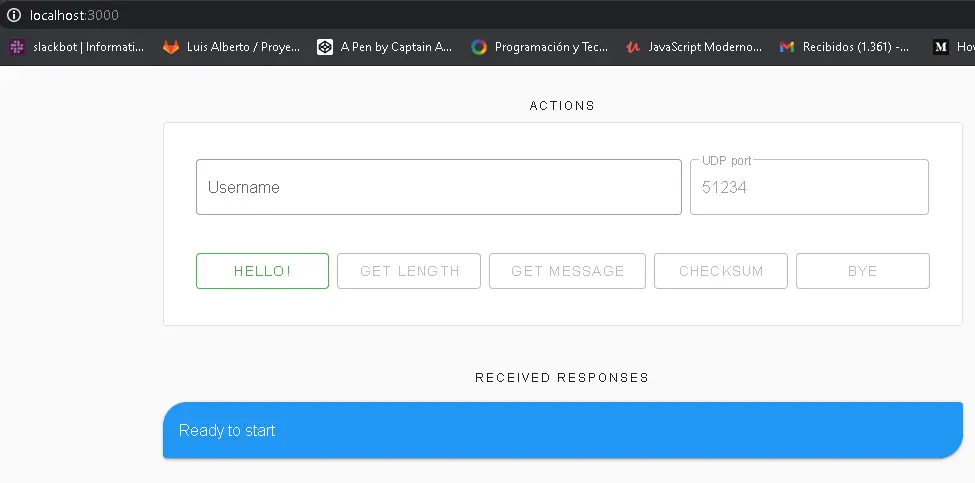
The web client provides a simple interface. Users enter their username and a UDP port number. They click buttons to send commands: say hello, request message length, retrieve the actual message, verify the checksum, or disconnect.
The backend handles protocol translation. When the browser sends a WebSocket message, the server converts it into a TCP command and sends it to the Python cluster. When the cluster responds via UDP, the server captures that data and pushes it back through WebSockets to the browser.
The Architecture
The project follows a layered architecture. Domain logic stays separate from infrastructure concerns.
The messaging layer defines what operations exist: send a greeting, request message length, fetch the message, validate checksums, and disconnect. Each operation maps to a specific command the Python cluster expects.
A repository handles the actual socket communication. It manages the TCP connection and creates UDP listeners on demand. When data arrives, it publishes events through an internal event bus.
The WebSocket gateway connects browsers to this system. It receives commands from clients, passes them to the messaging service, and broadcasts responses back. NestJS decorators make this clean to implement.
Protocol Translation
The Python cluster expects specific text commands over TCP:
helloiam usernameto authenticatemsglento get the message lengthgivememsg portto receive the message on a UDP portchkmsg hashto verify message integritybyeto disconnect
The server wraps these commands in proper socket operations. It opens a persistent TCP connection to the cluster. For UDP, it creates a temporary listener whenever the user requests the actual message content.
Messages from the cluster come back encoded in base64. The server decodes them before sending to the browser. This ensures binary data survives the journey through WebSockets.
Event-Driven Communication
An event bus coordinates communication between components. When data arrives from the cluster, the socket repository publishes an event. The messaging service subscribes to these events and forwards them to connected browsers.
This decoupling keeps the code modular. The socket code does not need to know about WebSockets. The WebSocket code does not care about TCP details. They communicate through events.
The browser also uses events. It listens for server responses and updates the UI accordingly. Success messages appear in blue cards. Retrieved quotes show in purple. Errors display in red.
UDP Message Retrieval
Fetching the actual message involves UDP, which adds complexity. The browser specifies which port to use. The server creates a UDP socket bound to that port. Then it sends the TCP command telling the cluster where to send the data.
The cluster transmits the message via UDP. The server captures it, decodes from base64, and closes the UDP socket. The decoded message travels back through WebSockets to the browser.
This dual-protocol approach was the core challenge. TCP handles the conversation flow. UDP delivers the payload. The server coordinates both seamlessly.
The Web Interface
The Vue.js client uses Vuetify for styling. Buttons enable and disable based on connection state. You cannot request a message before authenticating. You cannot disconnect before connecting.
A response history shows all server messages. Each response gets categorized: success, message content, or error. The interface provides visual feedback for every action.
The client connects to the server through Socket.IO. This handles reconnection automatically if the connection drops. Connection status appears in the response history too.
Checksum Validation
The protocol includes integrity verification. After receiving a message, users can verify it with the server. The client computes an MD5 hash of the message and sends it through the validation command.
This confirms the message arrived intact. Network transmission can corrupt data. The checksum catches these problems before they matter.
Challenges I Faced
UDP required special handling. Unlike TCP, UDP does not maintain connections. Each message is independent. The server had to coordinate timing carefully. Create the listener, tell the cluster where to send, wait for data, clean up.
Windows firewalls caused problems during testing. UDP packets from remote servers often get blocked by default. We had to document firewall configuration steps for Windows users.
VPN requirements added another layer. The Python cluster lived on a private network. Disconnections from the VPN caused confusing errors. The server retries connections automatically, but initial diagnosis was tricky.
What I Learned
Building this project taught me how different network protocols complement each other. TCP provides reliable, ordered delivery for commands. UDP offers speed for bulk data transfer. Using both together requires careful coordination.
The architecture patterns proved valuable too. Separating protocol handling from business logic made the code testable. The event bus pattern kept components loosely coupled. These patterns apply far beyond socket programming.
Working with real network infrastructure exposed edge cases that theoretical knowledge does not cover. Timeouts, retries, reconnection logic. Production network code needs to handle failure gracefully.
If you are working with network protocols or need to bridge different communication systems, I would be happy to discuss approaches.