Built in 2019
Cellular Automaton
Game of Life in color
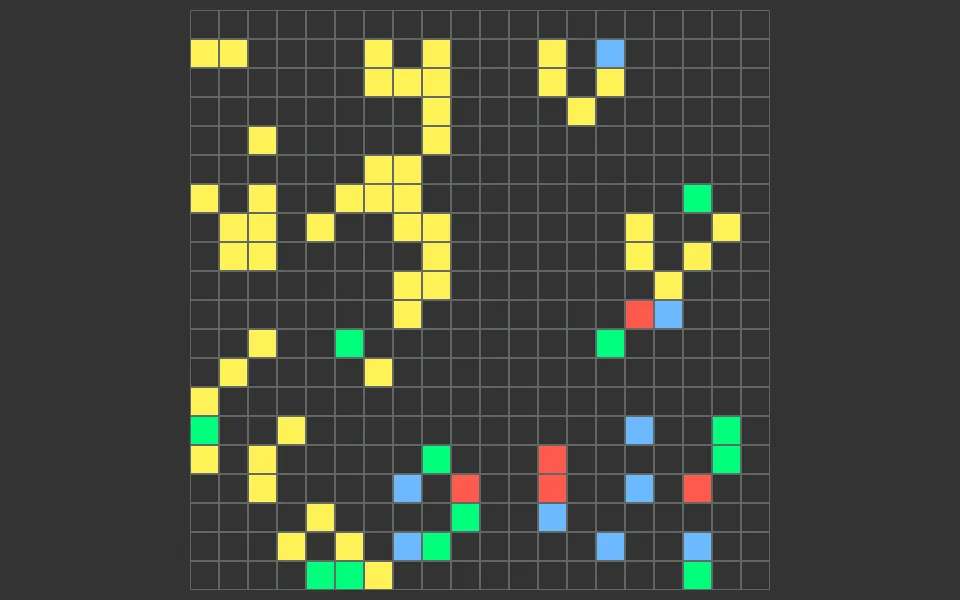
Conway's Game of Life on an HTML canvas, where new cells inherit a mix of their neighbors' colors.
Made with
Two rules are enough to make a grid of squares look alive. A dead cell with exactly three live neighbors is born. A live cell with two or three live neighbors survives. Every other cell dies or stays empty.
That is Conway’s Game of Life. It has no players and no goal. You draw a pattern, press start, and watch it grow, move and fade. It is often shown in black and white.
On April 27, 2019, I built my own version in one day with vanilla JavaScript and a canvas. I gave it a small twist. The cells have colors, and a newborn cell takes its color from its parents. I called it “Juego de la vida lleno de color”, a Game of Life full of color.
What a cellular automaton is
A cellular automaton is a grid of cells that change step by step. Each cell has a state, like alive or dead. At every step, all cells look at their neighbors and follow the same rules to pick their next state.
Nobody controls a single cell. Still, gliders that walk across the board and shapes that blink forever appear on their own. Simple local rules make complex global behavior. That idea is why people still play with it.
Painting the first cells
The page shows a 600x600 pixel canvas split into a 20x20 grid. Each square is 30 pixels wide with a one pixel gap around it.
Below the canvas there are five buttons. Four pick a color: yellow, green, blue and red. The last one, “Empezar”, starts the simulation.
You draw with the mouse. Click an empty square and it fills with the current color. Keep the button down and drag to paint a line. If your first click lands on a live cell, the drag erases instead. That small detail lets you fix a pattern without an eraser tool.
One generation every half second
After you press start, a timer runs every 500 milliseconds. Each tick computes one new generation.
The code does not change the board in place. It builds a brand new board and then swaps it in. This matters. If you update cells one by one, a cell would see some neighbors from the new generation and some from the old one. The rules only work when every cell reads the same snapshot.
For each cell, the code visits the 3x3 block around it. It counts the live neighbors and applies the two rules from the start. The grid does not wrap around. A cell on the edge simply has fewer neighbors, so patterns that reach the border behave differently.
Mixing colors with weights
The color is the part I made up. Each color has a number. Yellow is 0.1, green is 0.3, blue is 0.5 and red is 0.8.
To get a new cell’s color, the code multiplies the 3x3 block by a small grid of weights and adds everything:
let filter = [[0.2,0.3,0.4],[0.1,1,0.1],[0.4,0.3,0.2]];Image editors use the same idea for blur and sharpen effects. They call this grid a kernel, and the operation a convolution. Here it mixes colors instead of pixels.
The sum then falls into a bucket. Below 0.3 is yellow. Below 0.5 is green. Below 0.8 is blue. Anything higher is red.
Two details make the result interesting.
- The weights are not symmetric. The top right and bottom left corners weigh 0.4. The other two corners weigh 0.2. The same three parents give a different child depending on where they sit.
- The center weighs 1. A live cell keeps its own value and adds its neighbors on top. Its color can stay the same or move up toward red, but it never goes down.
Here is an example. Three yellow parents can only make a yellow child, because their sum stays below 0.12. Three red parents can make a green, blue or red child, depending on their positions. Over time, crowded areas drift toward red, while lonely yellow patterns stay yellow.
Small code, small quirks
The whole project is five short files. One draws rectangles, one defines a cell, one holds the board and its rules, and one wires the buttons. A cell knows its square, its value and its color. It draws itself as soon as it is created, so building the new board also paints it.
The code is not perfect. The start button creates a new timer on every click. Press it twice and the simulation runs twice as fast. I left it as it was.
What the colors taught me
The Game of Life is a classic first project, and for good reason. You learn to separate state from drawing. You learn why a new generation needs its own copy of the board. You see how a tiny rule set creates surprising patterns.
Adding color showed me one more thing. A rule that only changes how cells look can still change what you notice. With colors, you can see which parents made which children, and how a group of cells ages over time.
Interested in working together? Check out my services and pricing to see how we can collaborate on your next project. Let's Build